Uso de Guest Code con Bproc de maestro
Este documento muestra como utilizar la herramienta guest code y un bproc de tipo maestro para visualizar el stock de un producto en cada depósito
Objetivo
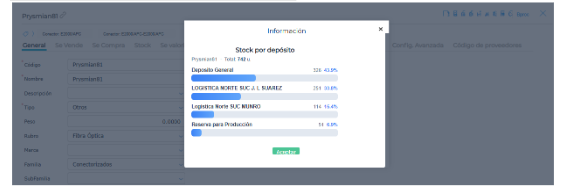
Permitir al usuario visualizar, directamente desde cada producto, el desglose detallado del stock físico existente en cada uno de los depósitos disponibles.
Descripción del caso
La idea de este caso es poder ver desde cada producto cuánto stock hay en cada depósito. Para esto, el guest code utiliza el resumen de stock por depósito para informar las cantidades.
Configuraciones
Para poder visualizar el stock en cada depósito desde un producto se deben configurar:
1 - Guest code: Para realizar el script utilizamos la IA Fini. Se le indica la necesidad junto con el contexto necesario y luego de algunas iteraciones se obtiene el script deseado:
import json
from finnegans.scripting import request, HTTPResponse
from finnegans.api import get_reporte
def build_html(producto: str, rows: list[dict]) -> str:
# Agrupar cantidad por depósito
stock: dict[str, float] = {}
for row in rows:
deposito = row.get("DEPOSITO") or "Sin depósito"
cantidad = float(row.get("CANTIDAD1") or 0)
stock[deposito] = stock.get(deposito, 0) + cantidad
if not stock:
return f"""<!DOCTYPE html><html><body><p>Sin stock registrado para <b>{producto}</b>.</p></body></html>"""
max_cantidad = max(stock.values()) or 1
total = sum(stock.values())
# Construir filas del gráfico: etiqueta arriba, barra abajo (layout compacto)
filas_barras = ""
for dep, cant in sorted(stock.items(), key=lambda x: -x[1]):
pct = cant / total * 100
filas_barras += f"""
<div class="bar-row">
<div class="bar-label">{dep}<span class="bar-val">{cant:g} <em>{pct:.1f}%</em></span></div>
<div class="bar-track"><div class="bar-fill" style="width:{pct:.2f}%"></div></div>
</div>"""
return f"""<!DOCTYPE html>
<html lang="es">
<head>
<meta charset="UTF-8">
<meta name="viewport" content="width=device-width, initial-scale=1">
<title>Stock por depósito</title>
<style>
*, *::before, *::after {{ box-sizing: border-box; margin: 0; padding: 0; }}
body {{ font-family: system-ui, sans-serif; background: #fff; color: #1e293b; padding: 14px 16px; font-size: 13px; }}
#titulo {{ font-size: 1rem; font-weight: 700; color: #1e3a5f; margin-bottom: 8px !important; margin-top: 8px !important; }}
.meta {{ font-size: .78rem; color: #64748b; margin-bottom: 14px; }}
.meta strong {{ color: #1e3a5f; }}
.bar-row {{ margin-bottom: 10px; }}
.bar-label {{
display: flex; justify-content: space-between; align-items: baseline;
font-size: .8rem; font-weight: 600; color: #334155; margin-bottom: 4px;
}}
.bar-val {{ font-weight: 400; color: #64748b; font-size: .78rem; }}
.bar-val em {{ font-style: normal; color: #3b82f6; font-weight: 600; }}
.bar-track {{
height: 18px; background: #e2e8f0; border-radius: 6px; overflow: hidden;
}}
.bar-fill {{
height: 100%; background: linear-gradient(90deg, #3b82f6, #60a5fa);
border-radius: 6px; min-width: 4px;
}}
</style>
</head>
<body>
<h1 id="titulo">Stock por depósito</h1>
<p class="meta">{producto} · Total: <strong>{total:g}</strong> u.</p>
{filas_barras}
</body>
</html>"""
def main():
raw = request.get_body() or b"{}"
try:
body = json.loads(raw.decode())
except Exception as e:
return HTTPResponse(400, body=json.dumps({"error": f"Body inválido — no es JSON: {e}"}, ensure_ascii=False))
producto = (body.get("object") or {}).get("code", "").strip()
if not producto:
return HTTPResponse(400, body=json.dumps({"error": "El campo 'object.code' es requerido y está vacío."}, ensure_ascii=False))
try:
result = get_reporte(
"resumenStockPorDeposito",
params={
"PARAMWEBREPORT_soloStockNoCero": "true",
"PARAMWEBREPORT_soloDepositos": "1",
"PARAMWEBREPORT_fecha": "getCurrentDate",
"PARAMWEBREPORT_producto": producto,
},
)
except Exception as e:
return HTTPResponse(502, body=json.dumps({"error": f"Error al consultar el reporte: {e}"}, ensure_ascii=False))
# Si la API devuelve un dict con "error", propagamos el error
if isinstance(result, dict) and "error" in result:
status = int(result.get("status") or 502)
return HTTPResponse(status, body=json.dumps({"error": result["error"]}, ensure_ascii=False))
# Normalizar a lista de dicts
if isinstance(result, dict):
rows = [v for v in result.values() if isinstance(v, dict)]
elif isinstance(result, list):
rows = [r for r in result if isinstance(r, dict)]
else:
rows = []
html = build_html(producto, rows)
return HTTPResponse(200, headers={"Content-Type": "text/html; charset=utf-8"}, body=html)
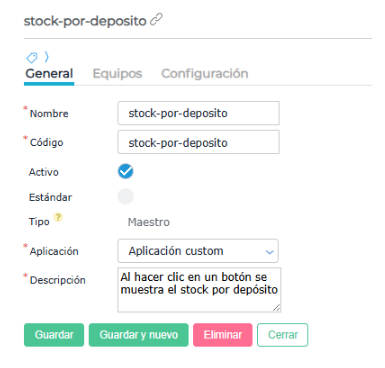
2 - Bproc: En este caso se utilizó un bproc de tipo maestro y modo manual
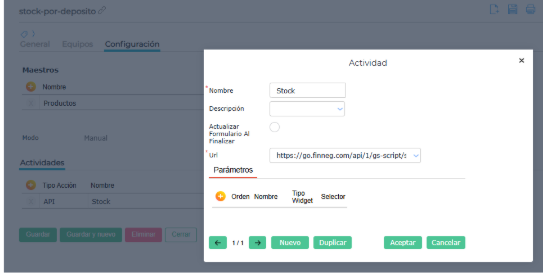
En el campo URL se pega la obtenida en el guest code
Resultado
Al ingresar a un producto desde el maestro, se verá un botón en la toolbar

Al hacer clic se ve la siguiente información